How to Set Up a Repeatable AI Development Workflow
The project instructions, reusable skill and verification loop I use—and a small setup you can adapt for your own project.
The project instructions, reusable skill and verification loop I use—and a small setup you can adapt for your own project.

A coding request usually explains what we want to build. It rarely explains the whole job: which task is ready, which decisions the agent can make, what needs checking, or what happens after the code is written.
Those are the parts I've been making reusable in our AI development workflow. We keep the task in a tracker, the project agreement in AGENTS.md, and the delivery procedure in a skill. Tools let the agent execute that procedure; tests, review and CI provide evidence that it worked.
Here's how to put those pieces together for your project. We'll use “Undo delete” in a notes app as a short illustrative task, rather than a released-product case study.
1. Make one task ready to implement
We use GitHub Issues because, in our setup, agents can work with the issue, branch, pull request and CI results conveniently in the same ecosystem.
The same workflow can use Jira, Trello or another tracker. What matters is that the agent can read the task, check dependencies, update its status and attach evidence. For example, Jira and Trello expose APIs you can connect through an authorised integration. Changing the tracker requires adapting that connection and its status mapping; the skill doesn't create access by itself.
Choose one place as the task record. Give each task an outcome, acceptance criteria, dependencies, verification requirements and permission boundaries. A ready task has enough information to begin and no unresolved prerequisite.
For our sample, the criteria could be:
- Deleting a note offers Undo for 30 seconds.
- Undo restores its title, text and labels, and the result survives a reload.
- After the window expires, quick Undo is unavailable and the note stays deleted.
- Other notes remain unchanged.
Thirty seconds is an illustrative product choice, not a standard. A real app should consider users who need longer or a recovery route beyond an expiring notification; W3C's timing guidance explains why time limits need care.
The point is to settle the expected behaviour before implementation. An agent shouldn't have to guess what “Undo” promises.
2. Write the project's working agreement
Repository instructions answer the questions that recur across tasks: which documents are authoritative, how to run checks, and when the agent should ask for a decision.
For Codex, we put those agreements in AGENTS.md. Its discovery rules let global and project guidance provide context at the start of work.
A small starting agreement might look like this. Replace the commands and tracker with your actual setup:
# Project agreement
- Approved requirements and the accepted task define the scope.
- Use the tracker as the task record; work on one ready task at a time.
- Implement in an isolated branch. Do not expand product scope.
- Run `npm test` and `npm run build` for relevant changes.
- Check changed user flows in the browser; record the evidence.
- Self-review the diff before requesting external review.
- Require passing CI on the current PR commit before merge.
- Ask me before merging, publishing or changing production.
- After an authorised merge, verify main and leave a handoff.
This is a sample agreement, not a rule that every project needs those commands. Our projects use different checks and authority boundaries. Instructions explain the policy; configured CI and repository protections help enforce the parts they can enforce.
3. Package the repeated procedure as a skill
We created autonomous-project-development by separating recurring delivery decisions from individual products. The project's requirements stayed in the repository; the reusable issue cycle became skill instructions, with references for adoption, handoffs and optional runner setup.
That skill does more than tell the agent to write code:
| Responsibility | What our skill directs the agent to do |
|---|---|
| Establish context | Inspect instructions, architecture, roadmap, tracker and existing work |
| Select work | Choose an unblocked task and check its scope and authority |
| Implement | Make an isolated change; use meaningful failing tests or reproductions for behaviour |
| Verify | Run appropriate checks and inspect the actual user flow where needed |
| Review | Self-review the full diff, obtain configured review and address findings |
| Finish | Check current-commit CI, merge only when authorised, verify main and update the task |
| Continue | Leave evidence, limitations and the next eligible task in a handoff |
We also use a honcho-memory skill to recall and save durable decisions, keeping project context separate from general practices. It supports continuity; current repository evidence still wins. Memory is optional for a starter workflow—you can begin with a concise handoff.
A skill gives the agent a procedure. It still needs working tools, appropriate access and an environment that can run the project. It also needs a trigger: invoking it starts work; creating the file doesn't create a background worker.
4. Create a small skill you can try today
For a Codex project, create .agents/skills/repeatable-development/SKILL.md. The official skills guide documents skill structure and discovery.
Start with a short procedure like this:
---
name: repeatable-development
description: Carry one ready development task through implementation,
  verification and review, following the project's authority boundaries.
---

Read AGENTS.md, the accepted task and relevant source before editing.
Check dependencies and permission boundaries; stop if the task is blocked.
Work in an isolated branch and stay within the accepted scope.
For changed behaviour, establish a meaningful failing check first.
Implement the change; run project checks and inspect relevant user flows.
Self-review the complete diff and fix actionable defects.
Open a PR only when authorised; inspect configured review and current-head CI.
Fix findings and rerun affected checks. Never infer permission to merge.
After an authorised merge, verify main and update the task with evidence.
Leave a handoff with the baseline, checks, limitations and next eligible task.
Keep tracker operations and test commands concrete in your project agreement. If the agent cannot access the tracker or run a required check, it should report that blocker rather than mark the task finished.
As the procedure grows, move useful detail into references and link them from SKILL.md. Add scripts when deterministic execution helps. Avoid turning the skill into a second copy of your product specification.
The planned follow-up, How to turn a repeated task into an AI skill (topic 09), will explore extracting, packaging and testing a skill in more depth. This starter is enough to try the delivery loop now.
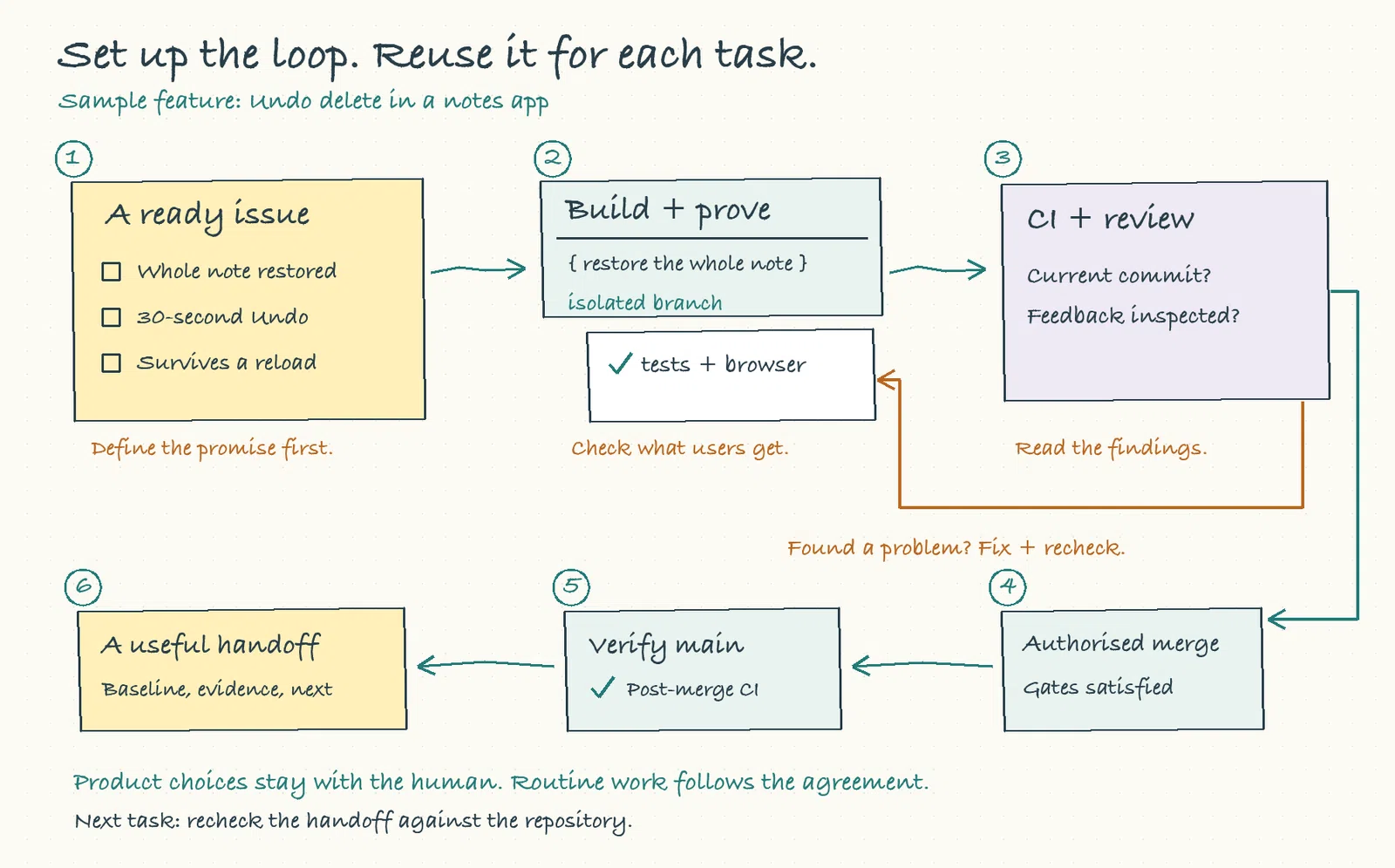
The skill coordinates this loop. Your project agreement supplies the checks, tools and authority.
5. Run one task and inspect the result
Connect your agent to the repository, tracker, test environment and review system. Confirm it can read the chosen task before asking it to make changes.
Then invoke the skill with a bounded request:
Use $repeatable-development for task NOTES-12.
Follow AGENTS.md. Implement and verify the accepted scope,
prepare a PR for review, and stop before merge.
NOTES-12 is a placeholder. Substitute your actual task ID or URL and adjust the requested actions to your permissions.
For our Undo example, useful evidence would include restoring the complete note, reloading the saved state, checking expiry and trying the button through the real app. A title-only test can give you a beautifully passing empty note.
CI—continuous integration—should check the current implementation commit. Review feedback needs inspection, including unresolved inline findings. If code changes afterwards, revisit the affected checks. After an authorised merge, verify the resulting main branch too.
Finally, inspect the handoff. Could a fresh agent identify the baseline, reproduce the checks and understand what remains? It should revalidate those details before continuing.
Try this on one small task before scaling up. When you have to repeat an instruction, decide where it belongs: the task, the project agreement or the reusable skill. That's how the workflow becomes useful—one explicit decision and one verifiable result at a time.